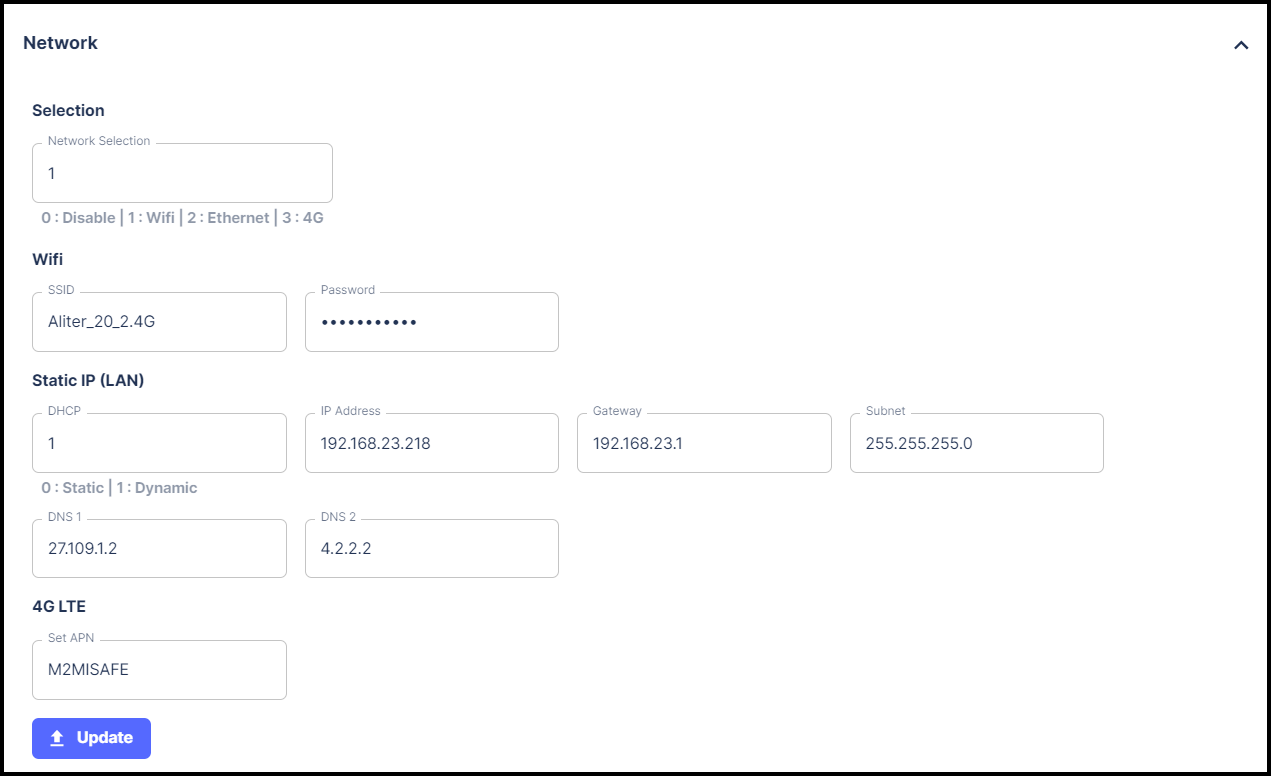
# Network

Enter the correct network configurations and click on <mark style="color:purple;">**Update**</mark>.

{% hint style="info" %} <mark style="background-color:red;">DO NOT update Network Selection with the value 0 (Disable).</mark>

If you update Network Selection with the value 0 (Disable), the gateway will get disconnected from all types of networks.&#x20;

In such a case, to connect it to a network, follow the steps given in [Gateway Onboarding](https://aliter-business-solutions.gitbook.io/iot-gateway-user-manual/gateway-onboarding).
{% endhint %}

<figure><img src="https://1313992628-files.gitbook.io/~/files/v0/b/gitbook-x-prod.appspot.com/o/spaces%2FdTvSz7jpW1e3wAaLdma4%2Fuploads%2FVHZ8H1YpwJMd1s2U2hbq%2Fss24%20frame.png?alt=media&#x26;token=5df8cc4d-d5a9-4700-9014-3b7bb4fc586e" alt=""><figcaption></figcaption></figure>

<table><thead><tr><th width="77">No.</th><th width="139">Field</th><th width="147">Default Value</th><th>Description</th></tr></thead><tbody><tr><td>1</td><td>Network Selection</td><td>1</td><td>0 = Disabled<br>1 = WiFi<br>2 = Ethernet<br>3 = 4G<br>Enter the value of the network mode you wish to set.</td></tr><tr><td>2</td><td>SSID</td><td></td><td>Enter SSID (Service Set Identifier) of the WiFi network you wish to connect to in WiFi mode.</td></tr><tr><td>3</td><td>Password</td><td></td><td>Enter the Password of the SSID you have entered in WiFi mode.</td></tr><tr><td>4</td><td>DHCP</td><td>1</td><td>0 = Static<br>1 = Dynamic<br>Enter desired IP configuration mode.</td></tr><tr><td>5</td><td>IP Address</td><td>192.168.23.218</td><td>The IP address to be assigned to the Gateway in the Static mode of IP configuration.</td></tr><tr><td>6</td><td>Gateway</td><td>192.168.23.1</td><td>Enter the gateway address where traffic destined for the internet is routed to in the Static mode.</td></tr><tr><td>7</td><td>Subnet</td><td>255.255.255.0</td><td>Enter Subnet mask of Gateway in the Static mode.</td></tr><tr><td>8</td><td>DNS1</td><td>27.109.1.2</td><td>Enter primary DNS server address in the Static mode.</td></tr><tr><td>9</td><td>DNS2</td><td>4.2.2.2</td><td>Enter secondary DNS server address in the Static mode.</td></tr><tr><td>10</td><td>Set APN</td><td>M2MISAFE</td><td>Enter APN for the cellular network in 4G mode.</td></tr></tbody></table>

{% hint style="info" %}
Please refer to the [Activity](https://aliter-business-solutions.gitbook.io/iot-gateway-user-manual/gateway-configuration/activity) section to verify that the network configuration has been updated successfully.
{% endhint %}
